How to Get Pro Tools and Start Producing Music Today
Pro Tools is the industry-standard digital audio workstation used by professional music producers, audio engineers, and sound designers worldwide. Whether you are a beginner or an experienced music maker, getting started with Pro Tools can feel overwhelming at first. This guide walks you through every step of how to get Pro Tools, from choosing the right version to setting up your first session. You will learn about pricing options, system requirements, and practical tips to jumpstart your music production journey right away.
Music production has never been more accessible. With the right software, anyone with a computer and a dream can create professional-quality tracks from home. Among all the options available, Pro Tools stands out as the gold standard in the industry. It powers some of the biggest studios in the world and has been the backbone of audio engineering for decades.
If you have ever wondered how to get Pro Tools and begin your journey as a music producer, you are in the right place. This guide breaks everything down into simple, actionable steps. You will learn about the different versions, what hardware you need, how much it costs, and how to set up your first session. Let us dive in.
Key Takeaways
- Multiple Editions Available: Pro Tools comes in Free, Artist, Studio, and Ultimate editions to fit every budget and skill level.
- System Requirements Matter: You need a reliable computer, audio interface, and studio monitors to get the best results.
- Subscription and Perpetual Licenses: Avid offers both monthly subscriptions and one-time perpetual licenses depending on your needs.
- Free Version Exists: Pro Tools Intro gives beginners a risk-free way to explore the software before committing financially.
- Learning Curve Is Worth It: Investing time in tutorials and practice pays off with professional-quality music production.
📑 Table of Contents
- What Is Pro Tools and Why Does It Matter?
- Choosing the Right Pro Tools Edition
- System Requirements for Pro Tools
- How to Download and Install Pro Tools
- Setting Up Your First Pro Tools Session
- Tips for Getting the Most Out of Pro Tools
- Common Mistakes Beginners Make
- How Much Does Pro Tools Cost?
- Pro Tools vs. Other DAWs
- Final Thoughts on Getting Started with Pro Tools
What Is Pro Tools and Why Does It Matter?
Pro Tools is a digital audio workstation (DAW) developed by Avid. It is used for recording, editing, mixing, and mastering audio. Many professional audio engineers and music producers rely on it daily. Its workflow is designed to handle everything from a simple podcast to a full orchestral score.
What makes Pro Tools special? First, it has been the industry standard for so long that most studios expect it. Second, its audio mixing and MIDI editing capabilities are incredibly powerful. Third, it integrates seamlessly with a wide range of hardware and plugins.
If you want to work in a professional recording studio, knowing Pro Tools is almost a requirement. Many job postings for audio engineering roles list it as a must-have skill. Learning it opens doors to career opportunities in music, film, television, and gaming.
Choosing the Right Pro Tools Edition
Not everyone needs the same version of Pro Tools. Avid offers several editions tailored to different users. Choosing the right one depends on your budget, experience level, and what you want to accomplish.
Pro Tools Free
Pro Tools Free is the perfect starting point for beginners. It gives you access to the core features of Pro Tools at zero cost. You can record up to 16 audio tracks, use virtual instruments, and apply basic effects. It is an excellent way to learn the interface and develop your skills without any financial risk.
The limitations are real though. You get fewer plugins, limited track counts, and no surround sound support. But for someone just getting started with music production, it is more than enough to build a solid foundation.
Pro Tools Artist
Pro Tools Artist is the mid-tier option. It costs less than the full Studio version but offers significantly more features than the Free edition. You get up to 128 audio tracks, advanced MIDI editing tools, and a wider selection of plugins.
This edition is ideal for independent musicians, small studios, and content creators. If you are serious about producing music but do not need every professional feature, Artist hits a sweet spot between cost and capability.
Pro Tools Studio
Pro Tools Studio is designed for dedicated music producers and small-to-medium studios. It includes advanced features like HDX acceleration, more plugin slots, and enhanced workflow tools. You also get access to a curated collection of virtual instruments and effects.
The price reflects its capabilities, but the value is excellent for those who need studio-grade tools without the Ultimate price tag. Many professional freelancers use Studio as their daily driver.
Pro Tools Ultimate
Pro Tools Ultimate is the top-of-the-line edition. It is built for large commercial studios and elite audio engineers. You get unlimited track counts, advanced surround and immersive audio formats, and the full suite of Avid plugins.
This is what Hollywood post-production houses and major record labels use. Unless you are working on large-scale projects or running a professional studio, Ultimate may be overkill. But if you need every tool available, it is the one.
System Requirements for Pro Tools
Before you download or purchase Pro Tools, make sure your computer can handle it. The system requirements vary by edition, but here are the general guidelines you need to follow.
Minimum Requirements
- Operating System: Windows 10 (64-bit) or macOS 10.14 or later
- Processor: Intel Core i5 or equivalent AMD processor
- RAM: 8 GB minimum (16 GB recommended)
- Storage: 15 GB of free disk space for installation
- Display: 1280 x 800 resolution minimum
Recommended Setup for Music Production
Meeting the minimum requirements will let Pro Tools run, but a better setup will make your experience much smoother. Here is what I recommend for a comfortable music production workflow:
- A multi-core processor like an Intel i7 or AMD Ryzen 7
- 16 GB of RAM or more
- A solid-state drive (SSD) for fast loading times
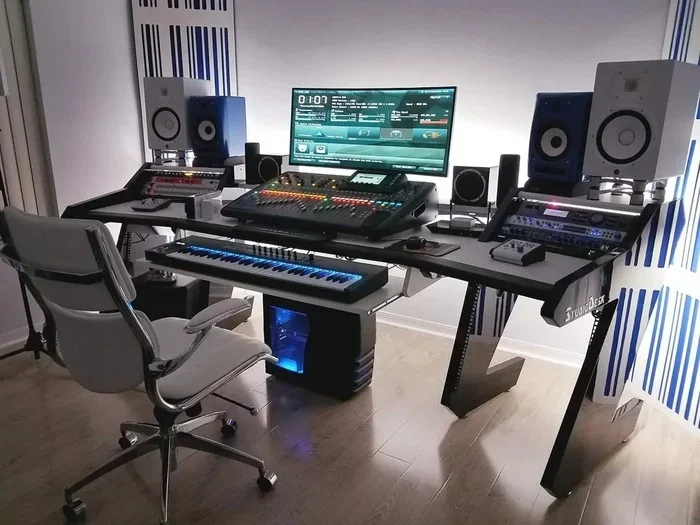
- A dedicated audio interface for recording
- Studio monitors or quality headphones for accurate monitoring
Your audio interface is especially important. It converts analog audio signals to digital data and vice versa. Without one, you cannot connect microphones or instruments properly. Popular choices include Focusrite Scarlett, Universal Audio Apollo, and PreSonus AudioBox.
How to Download and Install Pro Tools
Getting Pro Tools onto your computer is straightforward once you know the steps. Here is a simple walkthrough to guide you through the process.
Step 1: Create an Avid Account
Visit the Avid website and create a free account. You will need this account to download the software and manage your license. Make sure to use a valid email address because Avid sends important license information there.
Step 2: Choose Your Edition
Navigate to the Pro Tools product page and select the edition you want. If you are unsure, start with Pro Tools Free or Pro Tools Artist. Both offer trial periods so you can test the software before committing.
Step 3: Purchase or Download
For paid editions, complete the purchase through the Avid store. You can choose between a subscription plan or a perpetual license. Subscription plans give you access to updates and cloud storage, while perpetual licenses let you keep a specific version indefinitely.
Step 4: Install and Activate
Download the installer from your Avid account dashboard. Run the installer and follow the on-screen prompts. Once installation is complete, launch Pro Tools and enter your license credentials to activate. The entire process usually takes less than 30 minutes.
Setting Up Your First Pro Tools Session
Now that Pro Tools is installed, it is time to create your first session. This is where the magic begins. A well-organized session saves you time and frustration as your project grows.
Creating a New Session
Open Pro Tools and click on File > New Session. You will see options for sample rate, bit depth, and session format. For most music production projects, set the sample rate to 44.1 kHz and the bit depth to 24-bit. These settings offer excellent audio quality and are industry standard.
Setting Up Your Tracks
Next, add the tracks you need. For a basic music production setup, you might want:
- One or two mono audio tracks for vocals or guitar
- Stereo audio tracks for drums or full mixes
- MIDI tracks for virtual instruments
- A master track for your final output
Use the Track menu to create new tracks quickly. Naming your tracks from the start keeps things organized, especially when you have dozens of tracks in a complex arrangement.
Adding Virtual Instruments and Plugins
Pro Tools supports a wide range of virtual instruments and plugin effects. You can load synths, samplers, EQ plugins, compressors, and reverb directly into your session. Many producers use third-party plugins from companies like Waves, Native Instruments, and FabFilter to expand their sound palette.
To add a plugin, click on a track and open the insert slot. Choose your plugin from the list and adjust the parameters to taste. Experimentation is key here. The more you play with different sounds, the better your productions will become.
Tips for Getting the Most Out of Pro Tools
Getting Pro Tools is only half the battle. Using it effectively is what separates hobbyists from serious producers. Here are some practical tips to help you get up to speed faster.
Learn Keyboard Shortcuts
Keyboard shortcuts dramatically speed up your workflow. Learn the essentials like Ctrl+Z for undo, Spacebar for transport controls, and B for the selector tool. Avid provides a downloadable shortcut reference guide on their website.
Use Templates
Creating session templates saves enormous amounts of time. Set up your preferred track layouts, routing, and plugin chains once, then reuse them for every new project. Many professional producers have templates ready for different genres like hip-hop, rock, or electronic music.
Watch Tutorials and Practice Daily
The best way to learn Pro Tools is by doing. Watch YouTube tutorials, follow along with free courses on platforms like Avid Learning, and practice every day. Even 30 minutes of focused practice builds skills faster than you might expect.
Invest in Good Monitoring
Your mix is only as good as what you hear. Invest in quality studio monitors or headphones to get an accurate representation of your audio. Cheap speakers can lie to you about bass levels, stereo imaging, and overall clarity.
Common Mistakes Beginners Make
Every music producer makes mistakes when starting out. Being aware of common pitfalls helps you avoid them and progress faster.
- Skipping the manual: Pro Tools has a detailed user guide. Reading it saves hours of frustration.
- Ignoring system maintenance: Keep your computer clean and updated to prevent crashes during long sessions.
- Overusing plugins: Too many effects can muddy your mix. Less is often more.
- Not saving frequently: Auto-save is your friend. Enable it and save manually every few minutes.
- Comparing too early: Your first mixes will not sound like professional releases. That is normal. Keep learning and improving.
How Much Does Pro Tools Cost?
Cost is one of the biggest factors when choosing music production software. Pro Tools offers flexible pricing options to suit different budgets. Pro Tools Free is, of course, completely free. Pro Tools Artist typically costs around $9.99 per month on subscription or a one-time perpetual fee. Pro Tools Studio runs higher, and Pro Tools Ultimate is the most expensive option aimed at professional studios.
Avid also offers bundled deals that include plugins and virtual instruments. These bundles add significant value if you need a full production toolkit right out of the box. Keep an eye on their seasonal sales for discounts.
Pro Tools vs. Other DAWs
While Pro Tools is the industry leader, other DAWs like Logic Pro, Ableton Live, and FL Studio have their strengths. Logic Pro is popular among Mac users for its all-in-one approach. Ableton Live excels in live performance and electronic music production. FL Studio is beloved by beat makers for its intuitive pattern-based workflow.
However, when it comes to professional audio engineering, recording studios, and post-production, Pro Tools remains unmatched. Its editing precision, routing flexibility, and industry adoption make it the go-to choice for serious audio work.
Final Thoughts on Getting Started with Pro Tools
Getting Pro Tools is one of the best decisions you can make as a music producer. It gives you access to professional-grade tools that can elevate your productions to the next level. Whether you start with the free version or jump straight into Studio, the key is to stay consistent and keep learning.
The music production journey is a marathon, not a sprint. Give yourself permission to experiment, make mistakes, and grow. With Pro Tools in your toolkit, you have everything you need to bring your creative vision to life. Start today, and you will be amazed at how far you can go.
Remember, every professional producer started exactly where you are now. The only difference is they took the first step. So download Pro Tools, fire up a session, and start creating your music today.
Frequently Asked Questions
Can I use Pro Tools on a laptop for music production?
Yes, Pro Tools works on laptops as long as they meet the system requirements. A laptop with at least 8 GB of RAM and an SSD will give you a solid experience. Many mobile producers use laptops with portable audio interfaces to create music anywhere.
Is Pro Tools Free worth using for beginners?
Absolutely. Pro Tools Free gives you access to the core features without any cost. It is the perfect way to learn the interface, practice recording and mixing, and decide if Pro Tools is the right DAW for you before spending money.
Do I need an audio interface to use Pro Tools?
While you can use your computer’s built-in microphone and speakers, an audio interface dramatically improves sound quality. It provides better preamps, lower latency, and more reliable recording. For any serious music production, an audio interface is a worthwhile investment.
What is the difference between subscription and perpetual Pro Tools licenses?
A subscription license requires monthly or annual payments and includes updates and cloud features. A perpetual license is a one-time payment for a specific version that you own forever. However, perpetual licenses do not include free updates to future versions.
How long does it take to learn Pro Tools?
The learning curve varies by person. If you practice consistently, you can become comfortable with the basics within a few weeks. Mastering advanced features like surround mixing and HDX acceleration may take several months of dedicated practice.
Can I use third-party plugins with Pro Tools?
Yes, Pro Tools supports third-party plugins in VST and Audio Units formats. Popular plugin developers like Waves, FabFilter, and Native Instruments offer compatible options. Just make sure your plugins are compatible with your Pro Tools version and operating system.
=== CONCLUSION ===
Getting Pro Tools is simpler than you might think, and the rewards are immense. From the free edition for beginners to the powerful Ultimate version for professionals, there is a Pro Tools option for everyone. You now know how to choose the right edition, set up your system, create your first session, and avoid common beginner mistakes.
The world of music production is waiting for you. Pro Tools gives you the tools to turn your ideas into polished, professional tracks. Start with the free version if you are unsure, invest in a good audio interface, and commit to daily practice. Your journey as a music producer begins with a single step. Take it today.