What Are MDM Tools and How They Can Transform Your Business
MDM tools are software platforms that let businesses manage, secure, and monitor mobile devices from one central dashboard. They help IT teams enroll devices, enforce security policies, and protect sensitive data across the entire mobile fleet. Whether you run a small team or a large enterprise, MDM tools save time, reduce risk, and keep operations running smoothly.
MDM tools have become essential for modern businesses. If your team uses smartphones, tablets, or laptops for work, you need a way to manage all those devices efficiently. That is exactly what MDM tools do. They give IT teams a central place to enroll devices, push updates, enforce security rules, and track compliance. In this article, we will break down everything you need to know about mobile device management solutions. You will learn how they work, why they matter, and how to pick the right one for your business.
The way we work has changed a lot. More employees use mobile devices than ever before. Remote work, hybrid offices, and field teams all rely on phones and laptops to stay productive. But with more devices comes more risk. Every device is a potential entry point for security threats. MDM tools solve this problem by giving IT teams visibility and control over every device on the network. Think of them as a command center for all your mobile hardware.
Whether you are a small business owner or an IT leader at a large company, understanding MDM tools is critical. They are not just for tech giants anymore. Businesses of all sizes use them to streamline operations and protect sensitive data. Let us dive into what these tools are and how they can help you.
Key Takeaways
- MDM tools centralize device management: IT teams can control all mobile devices from a single platform, making updates and troubleshooting faster.
- Security is a top benefit: These tools enforce policies, enable remote wipes, and protect against data breaches on lost or stolen devices.
- MDM tools support BYOD programs: They let employees use personal devices for work while keeping corporate data separate and safe.
- Choosing the right tool matters: Factors like scalability, ease of use, and integration with existing systems should guide your decision.
- Getting started is straightforward: Most MDM platforms offer simple setup, device enrollment, and pre-built policy templates.
- MDM tools reduce IT workload: Automation handles repetitive tasks so your team can focus on bigger strategic goals.
📑 Table of Contents
What Are MDM Tools?
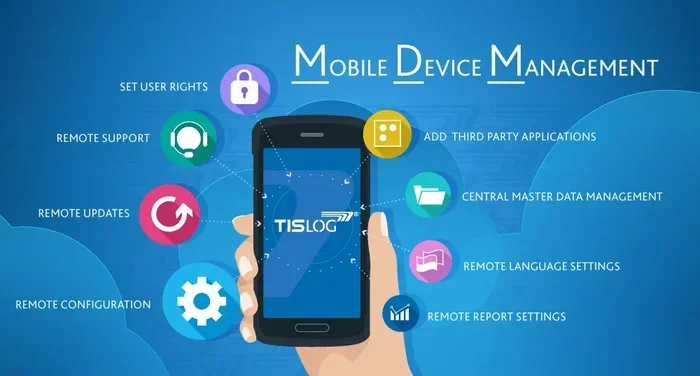
MDM tools, short for Mobile Device Management tools, are software platforms designed to manage mobile devices remotely. These devices include smartphones, tablets, laptops, and even IoT gadgets. The main goal is to give IT administrators control over devices without needing physical access to each one.
At their core, MDM tools use a client-server model. A software agent installs on each device. This agent communicates with a central management server. The server sends commands, pushes policies, and collects data from all enrolled devices. This setup lets IT teams handle hundreds or even thousands of devices from one dashboard.
Mobile device management is not just about locking down devices. It is about creating a balance. You want your team to be productive. You also want your data to be safe. Good MDM tools make that balance easier to achieve. They provide the right level of control without annoying end users.
How Do MDM Tools Work?
Understanding how MDM tools work helps you see their value. The process usually starts with device enrollment. An employee downloads a management profile or app on their device. This profile connects the device to the MDM server. From that point on, the server can send commands to the device.
Once enrolled, the MDM platform applies configuration profiles. These profiles set rules for the device. For example, a profile might require a PIN code. It might also restrict certain apps or websites. The device follows these rules automatically. IT teams do not need to touch each device individually.
Most MDM solutions also support over-the-air updates. This means IT can push software updates, security patches, and new policies to all devices at once. No need for manual installation. This saves a huge amount of time, especially for large organizations.
Key Features of MDM Tools
Not all MDM tools are the same. But most quality platforms share a core set of features. Let us look at the most important ones.
Device Enrollment and Provisioning
Device enrollment is the first step in any MDM setup. Good tools make this process fast and easy. Many platforms support zero-touch enrollment. This means devices can be pre-configured before they even reach the user. The employee just turns the device on and follows a few prompts.
Device provisioning goes hand in hand with enrollment. It sets up the device with all the apps, settings, and access credentials the user needs. This way, a new employee can start working right away. IT does not have to spend hours setting up each device manually.
Security and Compliance Management
Security is one of the biggest reasons businesses use MDM tools. These platforms enforce security policies across all devices. They can require strong passwords, enable encryption, and block unauthorized apps.
Compliance management is another key feature. Many industries have strict rules about data handling. MDM tools help businesses stay compliant by enforcing rules and generating audit reports. If a device falls out of compliance, the system can flag it automatically.
Remote Wipe and Lock
Lost or stolen devices are a nightmare for any business. MDM tools let IT teams wipe or lock a device remotely. This protects sensitive data from falling into the wrong hands. A remote wipe can happen in seconds, even if the device is offline. When it comes back online, the wipe command executes automatically.
App Management
Managing apps on multiple devices is tough without the right tools. MDM platforms let IT teams distribute, update, and remove apps remotely. They can also blacklist or whitelist specific apps. This ensures employees only use approved software on company devices.
Monitoring and Reporting
Visibility is power. MDM tools provide detailed dashboards showing device status, usage patterns, and compliance levels. IT teams can generate reports on demand. These reports help identify issues early and make informed decisions about device policies.
Benefits of Using MDM Tools
Now that you know what MDM tools do, let us talk about why they matter. The benefits go far beyond simple device tracking.
Improving IT Efficiency
Manual device management is slow and error-prone. MDM tools automate most of the routine tasks. Software updates, policy enforcement, and troubleshooting can all happen remotely. This frees up IT staff to focus on bigger projects and strategic initiatives.
For small businesses especially, this is a game changer. You might not have a dedicated IT team. MDM tools let you manage devices effectively without hiring extra staff. The automation does the heavy lifting.
Enhancing Security
Data breaches are costly. They can damage your reputation and hurt your bottom line. MDM tools add a strong layer of protection. They enforce encryption, require secure authentication, and enable remote wipe for lost devices.
With a mobile security platform in place, you can sleep better at night. You know that even if a device leaves the office, your data stays protected. Many MDM tools also support threat detection. They can flag suspicious activity before it becomes a real problem.
Supporting Remote and Hybrid Work
Remote work is here to stay. MDM tools make it easier to manage a distributed workforce. Employees can work from anywhere while IT maintains control over company data. Device tracking and geolocation features add an extra layer of oversight for field teams.
Reducing Costs
Investing in MDM solutions can save you money in the long run. Automated management reduces the need for manual IT labor. Fewer data breaches mean lower recovery costs. And better device lifecycle management helps you get more value from your hardware investments.
Who Needs MDM Tools?
MDM tools are not just for large corporations. A wide range of businesses benefit from them. Here are some examples:
- Healthcare organizations: Hospitals and clinics use tablets for patient records. MDM tools keep those devices secure and compliant with HIPAA regulations.
- Retail chains: Stores use mobile devices for inventory and point-of-sale operations. MDM helps manage hundreds of devices across many locations.
- Field service companies: Technicians working in the field rely on mobile devices. MDM tools ensure those devices stay updated and secure.
- Financial firms: Banks and investment firms handle sensitive client data. MDM tools enforce strict security policies on all devices.
- Small and medium businesses: Even small teams benefit from centralized device management. It saves time and reduces risk without a large IT budget.
Any business that uses mobile devices for work can benefit from MDM tools. The key is choosing a solution that fits your specific needs and budget.
How to Choose the Right MDM Tool
With so many options on the market, picking the right MDM platform can feel overwhelming. Here are the factors to consider.
Scalability
Your business will grow. Your MDM tool should grow with it. Look for a platform that can handle an increasing number of devices without slowing down. Some tools work great for small teams but struggle at scale. Check the pricing tiers and device limits before you commit.
Ease of Use
The best MDM tool in the world is useless if no one can figure it out. Choose a platform with a clean, intuitive dashboard. Setup should be straightforward. Day-to-day management tasks should be simple enough for non-technical staff. If your IT team is small, ease of use becomes even more important.
Integration Capabilities
Your MDM tool should play well with your existing software. Look for integrations with email platforms, identity providers, and endpoint protection tools. The more systems it connects to, the more value you get from it. Just like you need to know what size hose to use with an air compressor for the right fit and performance, you need to ensure your MDM tool integrates smoothly with your current tech stack.
Security Features
Security should be a top priority. Look for features like multi-factor authentication, encryption, and conditional access policies. Some platforms also offer advanced threat detection and behavioral analytics. The more security features a tool offers, the better protected your data will be.
Customer Support
When something goes wrong, you want help fast. Choose a vendor that offers responsive customer support. Look for options like live chat, phone support, and dedicated account managers. Reading reviews from other users can also give you a sense of the support quality.
Pricing
MDM tool pricing varies widely. Some charge per device per month. Others offer flat-rate plans. Make sure you understand the pricing model before signing up. Watch out for hidden fees, such as charges for premium features or extra support tiers.
Getting Started with MDM Tools
Ready to try MDM tools for your business? Here is a simple roadmap to get started.
- Assess your needs: List all the devices you need to manage. Identify your biggest pain points and security concerns.
- Research platforms: Compare at least three MDM providers. Look at features, pricing, and user reviews.
- Start with a pilot: Enroll a small group of devices first. Test the platform and gather feedback from users.
- Roll out gradually: Once the pilot succeeds, expand enrollment to more devices and departments.
- Train your team: Make sure IT staff know how to use the platform. Provide simple guides for end users as well.
- Review and optimize: Regularly check your MDM setup. Update policies and adjust configurations as your needs evolve.
Starting small is the best approach. It lets you learn the tool without overwhelming your team. As you gain confidence, you can unlock more advanced features and expand your coverage.
Common Mistakes to Avoid
Even with the best intentions, businesses sometimes make mistakes with MDM tools. Here are a few to watch out for.
- Skipping the pilot phase: Going live with all devices at once is risky. A pilot helps you catch issues early.
- Over-restricting devices: Too many rules can frustrate employees. Find a balance between security and usability.
- Ignoring updates: MDM tools get better over time. Keep your platform updated to take advantage of new features.
- Not training users: If employees do not understand the MDM setup, they may resist it or use workarounds.
- Choosing based on price alone: The cheapest option is not always the best. Consider features, support, and long-term value.
Avoiding these pitfalls will set you up for a smoother MDM experience. Take your time, plan carefully, and involve your team in the process.
Expert Insights on MDM Tools
Industry experts agree that MDM tools are no longer optional. They are a necessity for any business using mobile devices. According to IT leaders, the shift toward remote work has accelerated MDM adoption significantly. Companies that invested in mobile device management early have been better positioned to handle security challenges and workforce changes.
One common theme among experts is the importance of choosing a platform that grows with your business. The MDM landscape is constantly evolving. New threats emerge, and new devices enter the market. Your tool needs to keep pace with these changes. Experts also stress the value of user education. Technology alone cannot solve every problem. Teaching employees about device security and best practices makes your MDM strategy much more effective.
Another insight from the field is to start with your most critical devices. Prioritize the ones that handle sensitive data or support key business operations. Once those are secure, you can expand coverage to less critical devices. This approach delivers quick wins and builds confidence in the MDM program.
Key Takeaways
- MDM tools centralize device management: IT teams can control all mobile devices from a single dashboard, saving time and reducing errors.
- Security is a top benefit: These tools enforce policies, enable remote wipes, and protect against data breaches on lost or stolen devices.
- MDM tools support BYOD programs: They let employees use personal devices for work while keeping corporate data separate and safe.
- Choosing the right tool matters: Factors like scalability, ease of use, and integration with your existing systems should guide your decision.
- Getting started is straightforward: Most MDM platforms offer simple setup, device enrollment, and pre-built policy templates.
- MDM tools reduce IT workload: Automation handles repetitive tasks so your team can focus on bigger strategic goals.
- Avoid common pitfalls: Skipping the pilot, over-restricting devices, and ignoring user training can derail your MDM efforts.
Frequently Asked Questions
What does MDM stand for?
MDM stands for Mobile Device Management. It refers to software tools that help businesses manage, secure, and monitor mobile devices like smartphones, tablets, and laptops from a central platform.
Are MDM tools only for large companies?
No, MDM tools benefit businesses of all sizes. Small and medium businesses can use them just as effectively as large enterprises. Many MDM platforms offer affordable plans designed for smaller teams with fewer devices.
Do MDM tools work with both company-owned and personal devices?
Yes, most modern MDM tools support both company-owned and personal devices. They are especially useful for BYOD (Bring Your Own Device) programs, where employees use their own phones or laptops for work tasks.
Can MDM tools see my personal data?
Good MDM tools are designed to separate work data from personal data. They typically only manage and monitor the work profile or container on the device. Personal photos, apps, and files usually remain private and untouched by the MDM system.
How much do MDM tools cost?
Pricing varies depending on the provider and the number of devices. Some platforms charge per device per month, while others offer flat-rate plans. Costs can range from a few dollars per device to enterprise-level pricing for large organizations.
Is it hard to set up MDM tools?
Most modern MDM platforms are designed to be easy to set up. Many offer guided enrollment, pre-built templates, and intuitive dashboards. A pilot rollout with a small group is a great way to get comfortable before expanding to all devices.
=== CONCLUSION ===
MDM tools are a powerful solution for any business that uses mobile devices. They simplify device management, strengthen security, and support modern work styles like remote and hybrid setups. From device enrollment to remote wipe, these platforms cover all the essentials of mobile device management. The right tool can save your IT team hours of work, protect your data from breaches, and give you peace of mind. Whether you are a small business or a large enterprise, investing in a solid MDM platform is a smart move. Start small, plan carefully, and scale as your needs grow. Your future self and your IT team will thank you.