Top Service Desk Management Tools to Transform Your IT
Service desk management tools are the backbone of modern IT support, helping teams handle tickets, incidents, and requests with speed and precision. The right platform can cut resolution times, improve user satisfaction, and free your IT staff from repetitive manual work. In this guide, we break down the top tools, key features, and practical tips to help you choose the best fit for your organization.
Running an IT team is no small feat. Every day, your support staff juggles dozens of tickets, user requests, and urgent incidents. Without the right setup, things fall through the cracks fast. That is exactly where service desk management tools come in. These platforms bring order to chaos by organizing requests, automating repetitive tasks, and giving your team a single place to work from. In this article, we will explore the best options available, what features matter most, and how to pick the right one for your setup.
If you have ever watched your IT support team drown in emails and spreadsheets, you know the pain point. Service desk management tools solve this problem by creating a structured workflow for every type of request. From password resets to major outages, these tools track everything from start to finish. The result is faster resolution times, fewer missed tickets, and a much happier end-user experience. Let us dive into what makes these tools so essential for modern IT operations.
Key Takeaways
- Service desk management tools centralize all IT support tasks in one place, making it easier for teams to track and resolve issues.
- Look for features like ticketing systems, workflow automation, and SLA monitoring when evaluating platforms.
- The best tool depends on your team size, budget, and specific needs like self-service portals or knowledge base integration.
- Automation rules and reporting dashboards save hours of manual work and improve decision-making.
- Implementing a new tool requires proper training, clear processes, and ongoing evaluation to get real results.
- Top platforms like Freshservice, Jira Service Management, and Zendesk offer strong end-user support and IT operations capabilities.
- Pairing software tools with solid ITIL practices ensures long-term success and scalability.
📑 Table of Contents
- What Are Service Desk Management Tools?
- Why Service Desk Management Tools Matter for Modern IT
- Top Service Desk Management Tools Reviewed
- Key Features to Look For in Service Desk Management Tools
- How to Choose the Right Service Desk Management Tool
- Common Mistakes to Avoid When Implementing Service Desk Tools
- Expert Tips for Getting the Most from Your Service Desk Tool
- Final Thoughts
What Are Service Desk Management Tools?
A service desk management tool is a software platform designed to help IT teams manage incidents, service requests, and user interactions. Think of it as the central hub for all IT support activity. Instead of scattered emails and sticky notes, everything lives in one system. This includes ticket tracking, communication logs, knowledge articles, and performance reports.
These tools are rooted in IT service management (ITSM) best practices. Many follow the ITIL framework, which provides a structured approach to delivering quality IT services. By using a help desk software platform built on these principles, teams can standardize their processes and measure what matters. The goal is simple: resolve issues faster and keep users productive.
How Service Desks Differ from Traditional Help Desks
A traditional help desk focuses mainly on fixing problems as they come in. A service desk goes further. It treats every interaction as a service opportunity. This means it handles not just bugs and outages but also change requests, asset tracking, and proactive monitoring. The shift from reactive to proactive support is what sets modern platforms apart.
For example, a basic ticketing system might just log a problem and assign it to someone. A full service desk management tool will also suggest solutions from a knowledge base, route the ticket to the right specialist, and track whether the fix met the agreed service level. That is a big difference in capability.
Why Service Desk Management Tools Matter for Modern IT
The way IT teams work has changed dramatically. Remote work, cloud services, and always-on business operations mean support requests never really stop. Service desk management tools give teams the structure they need to handle this volume without burning out. Here is why they matter so much today.
Faster Resolution Times
When every ticket has a clear path from submission to resolution, your team works faster. Workflow automation handles the repetitive steps so agents can focus on complex issues. Automated routing ensures that a network problem goes to the network team, not the general queue. This alone can cut your average resolution time by a significant margin.
Better End-User Experience
End users want simple, fast support. A self-service portal lets them submit tickets, check status, and find answers without waiting for a human agent. A well-built knowledge base inside the tool empowers users to solve common problems on their own. This reduces the load on your team and improves the overall customer experience.
Stronger Accountability and Reporting
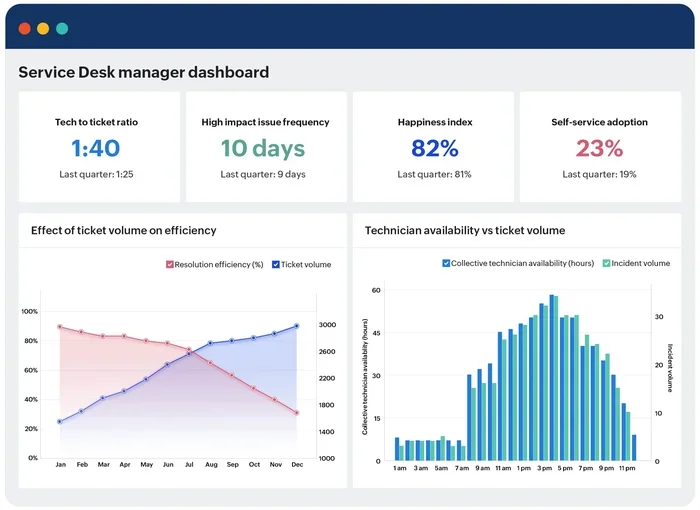
Without the right tools, it is hard to know how your team is really performing. Reporting dashboards in service desk management tools show you metrics like first-call resolution rate, average handle time, and ticket backlog. These insights help managers spot bottlenecks, coach their team, and prove the value of IT to the business.
Compliance and Audit Readiness
Many industries require detailed records of IT activities. A good service desk management tool keeps a full audit trail of every action taken. This makes compliance reporting much easier and reduces the risk of gaps during audits. Change management workflows also ensure that no updates happen without proper approval and documentation.
Top Service Desk Management Tools Reviewed
Now let us look at the platforms that stand out in the market. Each has its strengths, and the best choice depends on your specific needs. Below are some of the top service desk management tools worth considering.
| Tool | Best For | Key Strength |
|---|---|---|
| Freshservice | Mid-sized IT teams | Intuitive interface and strong automation |
| Jira Service Management | Agile IT teams | Deep integration with Jira ecosystem |
| Zendesk | Customer-facing support | Omnichannel support and ease of use |
| ServiceNow | Large enterprises | Enterprise-grade ITSM and scalability |
| ManageEngine ServiceDesk Plus | Budget-conscious teams | Rich features at an affordable price |
Freshservice
Freshservice is a cloud-based service desk management tool that excels in simplicity and speed. It offers built-in ITIL-aligned processes for incident, problem, and change management. The automation features are powerful yet easy to configure, making it a favorite for teams that want quick wins without a steep learning curve.
Jira Service Management
If your organization already uses Jira for development, Jira Service Management is a natural fit. It brings incident management and service request management into the same ecosystem. The tool is highly customizable, and its workflow automation capabilities are among the best in the industry. It is ideal for IT teams that live and breathe the Jira platform.
Zendesk
Zendesk shines when your service desk also handles customer-facing support. Its omnichannel approach means agents manage emails, chats, phones, and social media from one place. The self-service portal and knowledge base features are top-notch, making it easy for end users to find answers fast.
ServiceNow
ServiceNow is the heavyweight champion for large enterprises. It offers a comprehensive IT operations management suite that covers everything from asset management to change management to SLA monitoring. The platform is highly scalable and deeply customizable, though it comes with a higher price tag and longer implementation time.
ManageEngine ServiceDesk Plus
For teams that need strong features without a big budget, ManageEngine ServiceDesk Plus delivers. It includes ITIL-based workflows, asset management, and reporting dashboards at a very competitive price. It is a solid choice for small to mid-sized organizations that want enterprise-grade capabilities on a tighter budget.
Key Features to Look For in Service Desk Management Tools
Not all platforms are created equal. When you are evaluating service desk management tools, focus on the features that will have the biggest impact on your team. Here is what really matters.
Ticketing and Incident Management
The core of any service desk is its ability to manage tickets efficiently. Look for a system that lets you create, assign, prioritize, and track tickets with ease. Incident management workflows should be flexible enough to handle everything from a minor bug to a critical system outage. The faster your team can classify and route tickets, the faster issues get resolved.
Workflow Automation
Automation is a game-changer for any IT support team. The best service desk management tools let you build automation rules that trigger actions based on specific conditions. For example, a high-priority ticket could automatically escalate to a senior agent, or a resolved ticket could trigger a satisfaction survey. This reduces manual work and ensures nothing slips through the cracks.
Knowledge Base and Self-Service
A strong knowledge base is one of the most valuable features any help desk software can offer. It lets users find answers on their own, reducing the number of tickets your team needs to handle. Look for tools that make it easy to create, organize, and update articles. A self-service portal tied to this knowledge base gives end users a seamless experience.
SLA Monitoring and Escalation
Service Level Agreements are critical for measuring IT performance. The best service desk management tools include built-in SLA monitoring that tracks response and resolution times against your targets. When a ticket is approaching its SLA breach, the system should automatically escalate it. This keeps your team accountable and your users informed.
Reporting and Analytics
Data drives improvement. Look for platforms that offer robust reporting dashboards with real-time metrics. Key reports should cover ticket volume, resolution trends, agent performance, and customer satisfaction scores. These insights help you identify areas for improvement and demonstrate the ROI of your IT operations to leadership.
Integration Capabilities
Your service desk should not live in isolation. The best tools integrate with your existing tech stack, including monitoring systems, communication platforms, and asset management databases. For instance, some platforms can even track physical IT infrastructure like cooling systems and facility equipment. If your organization uses Atlas Copco air compressor service for data center cooling, you want a tool that can link those maintenance schedules to your overall IT asset inventory. Similarly, tracking air compressor parts and service records alongside software tickets gives your team a complete picture of facility health. And when managing building systems, having compressor pump and service logs accessible from the same dashboard ensures nothing gets overlooked. These integrations create a truly unified IT operations environment.
How to Choose the Right Service Desk Management Tool
Choosing the right service desk management tool is a big decision. It affects your team’s daily workflow and the experience of every end user. Here is a practical approach to making the right choice.
Step 1: Define Your Needs
Start by listing your top priorities. Do you need strong workflow automation? Is a self-service portal more important? Are you focused on incident management or change management? Write down your must-haves and nice-to-haves. This clarity will save you time during the evaluation process.
Step 2: Consider Your Team Size and Growth
A tool that works for a team of five may not scale to fifty. Think about where your IT support team will be in one to two years. Choose a cloud-based service desk that can grow with you without requiring a full platform swap. Scalability should be a top criterion in your evaluation.
Step 3: Evaluate Ease of Use
The most powerful tool in the world is useless if your team refuses to use it. During demos, pay attention to how intuitive the interface feels. Can agents navigate it without extensive training? Can end users submit tickets without confusion? A clean, simple design leads to higher adoption rates and better results.
Step 4: Test Before You Commit
Always take advantage of free trials. Set up a few test tickets, build a simple automation rule, and explore the reporting dashboards. Get feedback from your team on what works and what does not. A hands-on trial gives you real confidence in your choice.
Step 5: Factor in Total Cost
Pricing models vary widely. Some tools charge per agent, while others base costs on ticket volume or features included. Beyond the subscription price, consider implementation costs, training time, and any customization expenses. The cheapest option is not always the best value. Focus on the total cost of ownership and the long-term return on investment.
Common Mistakes to Avoid When Implementing Service Desk Tools
Even the best service desk management tool can fail if the implementation is done poorly. Here are common mistakes to watch out for.
- Skipping process mapping. Do not just copy your old manual processes into a new tool. Use the platform as an opportunity to streamline and improve your workflows first.
- Over-customizing too early. Start with out-of-the-box settings and customize gradually. Too many changes at once create confusion and make the system hard to maintain.
- Ignoring training. Your team needs proper training to use the tool effectively. Budget time for onboarding sessions and ongoing support.
- Neglecting the knowledge base. A knowledge base is only useful if it is kept up to date. Assign owners for key articles and review them regularly.
- Not tracking the right metrics. Focus on metrics that drive real improvement, such as first-call resolution rate and customer satisfaction, not just raw ticket counts.
Expert Tips for Getting the Most from Your Service Desk Tool
Once you have chosen and implemented your service desk management tool, the work is not done. Here are expert tips to maximize its value.
- Start small and expand. Roll out core features first, then add advanced capabilities like automation rules and SLA monitoring as your team gets comfortable.
- Encourage self-service. Promote your self-service portal and knowledge base to end users. The more they use these resources, the less burden falls on your agents.
- Review reports weekly. Make it a habit to check reporting dashboards every week. Look for trends, spot recurring issues, and adjust your processes accordingly.
- Gather feedback regularly. Ask your team and end users what is working and what is not. Their input will guide your optimization efforts.
- Align with ITIL best practices. Even if you do not follow ITIL to the letter, its principles provide a solid foundation for structuring your IT service management processes.
The right service desk management tool is more than just software. It is a strategic investment in your IT support capability. When chosen and used well, it transforms how your team works and how users experience IT support. The key is to approach the selection process with clear goals, involve your team, and commit to continuous improvement.
Final Thoughts
Service desk management tools have become essential for any IT team that wants to deliver fast, reliable support. From ticketing systems and workflow automation to self-service portals and SLA monitoring, these platforms cover every aspect of modern IT operations. The tools reviewed in this article represent some of the best options on the market, each with its own strengths for different team sizes and needs.
Take the time to evaluate your options carefully. Define your priorities, test the platforms that interest you, and involve your team in the decision. The right service desk management tool will not just improve your daily operations. It will transform the way your entire organization experiences IT support. Start your evaluation today and take the first step toward a more efficient, responsive, and scalable IT support operation.
Frequently Asked Questions
What is a service desk management tool?
A service desk management tool is a software platform that helps IT teams manage incidents, service requests, and user interactions in a centralized system. It typically includes features like ticketing systems, workflow automation, knowledge bases, and SLA monitoring to streamline IT service management processes.
How do I know which service desk tool is right for my team?
Start by identifying your team’s biggest pain points and priorities. Consider factors like team size, budget, existing tech stack, and whether you need end-user support features or advanced IT operations capabilities. Most platforms offer free trials, so testing before committing is always a smart move.
Can small businesses benefit from service desk management tools?
Absolutely. Many service desk management tools are designed to scale, and several offer affordable plans for small teams. Tools like ManageEngine ServiceDesk Plus and Freshservice are particularly popular with smaller organizations that need strong features without a big investment.
What is the difference between a help desk and a service desk?
A traditional help desk focuses primarily on fixing technical problems as they arise. A service desk takes a broader approach, managing the full lifecycle of IT services including incident management, change management, asset tracking, and proactive support. The ITIL framework often guides service desk practices.
Do service desk tools integrate with other IT systems?
Yes, most modern service desk management tools offer integrations with monitoring systems, communication platforms, and asset management databases. Some can even connect to facility management systems, including tracking Atlas Copco air compressor service schedules or air compressor parts and service records alongside software tickets for a unified view of IT and physical infrastructure.
How long does it take to implement a new service desk tool?
Implementation time varies depending on the platform and the complexity of your setup. Simple cloud-based tools can be up and running in a few days, while enterprise platforms like ServiceNow may take several weeks or months. Proper training and phased rollouts help ensure a smooth transition and long-term success.
=== CONCLUSION ===
Service desk management tools are no longer optional for IT teams that want to stay competitive. They bring structure, speed, and intelligence to the way support work gets done. Whether you are a small team looking for a simple ticketing system or a large enterprise seeking a full ITSM platform, there is a solution that fits your needs.
Focus on the features that matter most to your team, take advantage of trials, and involve your people in the process. The right tool will pay for itself many times over through faster resolutions, happier users, and a more productive IT support team. Make the smart choice today and invest in a tool that will serve your organization for years to come.