Best Business Process Mapping Tools for Your Business
Business process mapping tools help teams visualize, analyze, and improve their workflows with ease. These platforms turn complex operations into clear, actionable diagrams that anyone can understand. In this guide, we review the top options and show you how to pick the right one for your needs.
Running a business means juggling a lot of moving parts. Tasks overlap. Teams depend on each other. Processes change every day. Without a clear picture of how things work, problems sneak in and slow you down. That is where business process mapping tools come in. They give you a visual blueprint of your workflows, making it easy to see what is working and what needs fixing.
In this article, we will walk through the best business process mapping tools available right now. We will compare features, pricing, and ease of use so you can make a smart choice. Whether you are a small startup or a large team, you will find something that fits. Let us dive in.
Key Takeaways
- Clear visualization: Business process mapping tools turn messy workflows into easy-to-follow diagrams.
- Better efficiency: Using the right tool helps teams spot bottlenecks and remove wasted steps.
- Wide range of options: From free tools like draw.io to enterprise platforms like Nintex, there is a solution for every budget.
- Easy to start: Most tools offer drag-and-drop editors and ready-made templates so you can begin mapping today.
- Team collaboration: Many platforms let multiple users work on process maps at the same time in real time.
- Scalability matters: Choose a tool that grows with your business and handles increasing complexity over time.
📑 Table of Contents
What Are Business Process Mapping Tools?
Business process mapping tools are software applications that help you create visual diagrams of your workflows. Think of them as digital whiteboards where you can map out every step in a process. From simple tasks like approving a purchase order to complex chains like onboarding a new employee, these tools make it all visible.
Most of these platforms use flowcharts, swim lanes, and diagrams to show how work moves from person to person. You can add conditions, loops, and decision points to make your maps detailed and accurate. The goal is simple: when everyone can see the process, it becomes easier to understand, discuss, and improve.
How Process Mapping Works
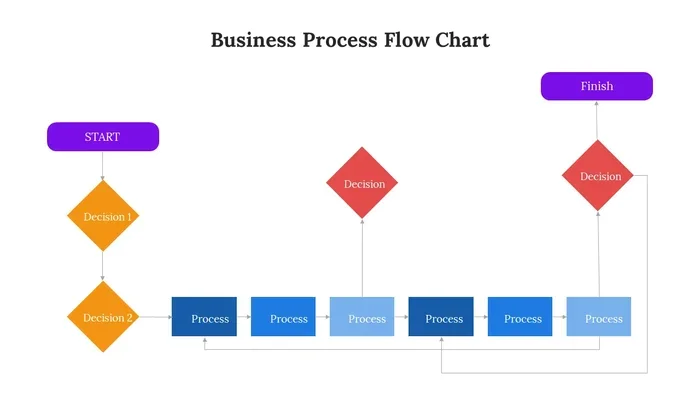
Process mapping starts with identifying a specific workflow. You then break it down into individual steps. Each step gets placed on a diagram in the order it happens. You add symbols like rectangles for tasks, diamonds for decisions, and arrows for flow direction.
Good process mapping software makes this easy with drag-and-drop builders. You do not need to be a designer or a tech expert. Most tools come with templates you can customize right away. Within minutes, you can have a clear map that your whole team can follow.
Types of Process Maps You Can Create
There are several types of maps you can build with process mapping tools:
- Flowcharts: The most common type. They show steps in a linear sequence with decision points.
- Swim Lane Diagrams: These show who is responsible for each step by organizing tasks into lanes for different teams or people.
- Value Stream Maps: These focus on the flow of materials and information, often used in manufacturing and lean management.
- SIPOC Diagrams: Suppliers, Inputs, Process, Outputs, and Customers. Great for high-level overviews of complex processes.
- BPMN Diagrams: Business Process Model and Notation. A standard format used by process analysts and consultants worldwide.
Why Every Business Needs Process Mapping
You might wonder, do you really need a business process mapping tool? The answer is yes. Here is why. When you cannot see your processes clearly, you cannot improve them. Hidden inefficiencies, duplicated tasks, and unclear responsibilities all stay hidden until you map them out.
Process mapping also helps with workflow automation. Once you see how a process works, you can identify steps that are perfect for automation. This saves time, reduces errors, and frees your team to focus on higher-value work.
Improving Operational Efficiency
Efficiency is the heartbeat of any successful business. When processes are unclear, people waste time figuring out what to do next. Mapping tools solve this by making every step obvious. Teams spend less time guessing and more time doing.
For example, a sales team might map their lead-to-close process. They discover that three different people handle the same task in three different ways. That is a clear opportunity for process standardization. Once standardized, the team works faster and makes fewer mistakes.
Better Decision Making
When leaders can see the full picture of a process, they make better decisions. Instead of relying on memory or guesswork, they look at the map. They can spot where delays happen, where costs pile up, and where customers feel frustrated.
Process analysis becomes much easier when you have a visual map. You can measure each step, track performance, and pinpoint areas for improvement. This data-driven approach leads to smarter, faster decisions across the entire organization.
Top Business Process Mapping Tools Reviewed
Now let us look at the best business process mapping tools on the market. We have picked a mix of options for different needs, budgets, and team sizes.
Lucidchart
Lucidchart is one of the most popular process mapping software options available. It offers a drag-and-drop editor with hundreds of templates. You can create flowcharts, org charts, wireframes, and more. It integrates with Google Workspace, Microsoft Office, and Slack, making it easy to share maps with your team.
Lucidchart works well for teams of all sizes. The free plan lets you get started, and paid plans unlock more shapes, templates, and collaboration features. It is a strong choice for business process modeling and day-to-day workflow documentation.
Microsoft Visio
Microsoft Visio has been a go-to mapping software for decades. It offers powerful diagramming tools and a huge library of shapes and templates. Visio integrates deeply with other Microsoft products like Teams, SharePoint, and Power BI.
The downside is that Visio can feel complex for new users. It also requires a Microsoft 365 subscription or a standalone license, which can be pricey for small teams. However, if you already live in the Microsoft ecosystem, Visio is a solid choice for process documentation and detailed modeling.
Miro
Miro is a collaborative whiteboard platform that also works well for process mapping. It is designed for remote teams who need to brainstorm and map processes together in real time. The infinite canvas and easy-to-use tools make it fun and intuitive.
Miro offers templates for flowcharts, user journeys, and sprint planning. It is more flexible than a pure process mapping tool, which can be a plus or a minus depending on your needs. If your team values collaboration and visual thinking, Miro is worth a serious look.
Bitrix24
Bitrix24 is a full-featured business process management platform. It combines process mapping with CRM, project management, and team communication. You can build detailed workflow diagrams and then turn them into automated processes right inside the platform.
Bitrix24 offers a generous free plan that includes process mapping features. The paid plans unlock more automation, storage, and customization options. It is an excellent choice for small to mid-sized businesses that want mapping and automation in one place.
Monday.com
Monday.com is known for its colorful, user-friendly project management interface. It also includes workflow automation and visualization features that support process mapping. You can create boards that represent your processes, track progress, and automate repetitive tasks.
Monday.com shines when it comes to ease of use. The learning curve is low, and the interface is intuitive. It is a great option for teams that want to start mapping quickly without a steep learning curve. The price is reasonable for the features you get.
Nintex
Nintex is built for businesses that need serious workflow automation alongside process mapping. It offers powerful tools for designing, automating, and optimizing processes. Nintex integrates with SharePoint, Microsoft 365, and many other enterprise platforms.
This tool is best suited for larger organizations with complex processes. The learning curve is steeper, and the pricing reflects the enterprise focus. But if you need deep automation and robust process modeling, Nintex delivers strong results.
Comparison Table
| Tool | Best For | Free Plan | Starting Price | Ease of Use |
|---|---|---|---|---|
| Lucidchart | Visual mapping and collaboration | Yes | $7.95/user/month | Very Easy |
| Microsoft Visio | Detailed enterprise diagrams | No | $5.00/user/month | Moderate |
| Miro | Remote team collaboration | Yes | $8/member/month | Very Easy |
| Bitrix24 | All-in-one BPM and CRM | Yes | Free plan available | Easy |
| Monday.com | Simple workflow automation | Yes | $9/seat/month | Very Easy |
| Nintex | Enterprise workflow automation | No | Custom pricing | Moderate |
How to Choose the Right Business Process Mapping Tool
With so many options, picking the right business process mapping tool can feel overwhelming. Here are the key factors to consider before you decide.
Key Features to Look For
Not all tools are created equal. Here are the features that matter most:
- Drag-and-drop editor: You should be able to build maps quickly without any technical skills.
- Templates: Pre-built templates save time and help you get started fast.
- Collaboration: Real-time editing and commenting let teams work together smoothly.
- Integration: Look for tools that connect with your existing apps like Slack, Google Workspace, or Microsoft 365.
- Export options: You should be able to export maps as PDF, PNG, or shareable links.
- Automation: Some tools let you turn maps into automated workflows, saving time and reducing errors.
Budget Considerations
Your budget plays a big role in choosing the right process mapping software. Free tools like draw.io and the free plans of Lucidchart or Miro are great starting points for small teams. As your needs grow, you can upgrade to paid plans that offer more features and capacity.
For larger businesses, enterprise tools like Nintex or Microsoft Visio may justify the cost through deep automation and integration capabilities. The key is to match the tool’s features to your actual needs. Do not pay for features you will never use.
Scalability and Growth
Think about where your business will be in one or two years. Will your team grow? Will your processes become more complex? Choose a business process mapping tool that can scale with you. A tool that works well for ten people should also handle fifty or a hundred without missing a beat.
Benefits of Using Process Mapping Tools
Using business process mapping tools brings real, measurable benefits to your organization. Here are the top advantages you can expect.
- Clarity: Every team member knows exactly what needs to be done and in what order.
- Efficiency: You identify and eliminate redundant steps, saving time and money.
- Accountability: Swim lane maps show who is responsible for each task, reducing confusion.
- Faster onboarding: New employees can learn processes quickly by looking at a clear map.
- Continuous improvement: Maps make it easy to spot areas for improvement and track progress over time.
- Better communication: Visual diagrams bridge gaps between technical and non-technical team members.
Quick Tips for Getting Started
Ready to start mapping? Here are some quick tips to help you hit the ground running:
- Start small: Pick one simple process to map first. Do not try to map everything at once.
- Involve your team: The people who do the work know the process best. Include them in mapping sessions.
- Keep it simple: Do not overcomplicate your maps. Focus on clarity over detail.
- Review regularly: Processes change. Set a schedule to review and update your maps every quarter.
- Use colors: Color-code steps by department, priority, or status to make maps easier to read at a glance.
- Share widely: Make your maps accessible to everyone who needs them. A map hidden in a folder does no good.
Expert Insights
According to process improvement experts, the biggest mistake companies make is treating process mapping as a one-time project. In reality, it is an ongoing practice. The best organizations map their processes, analyze them, improve them, and then map again. This cycle of continuous improvement is what drives long-term success.
Another expert tip is to always map the “as-is” process before designing the “to-be” process. Understanding the current state helps you identify pain points and prioritize improvements. Skipping this step often leads to maps that look good on paper but do not solve real problems.
Common Mistakes to Avoid
Even with the best business process mapping tools, mistakes can happen. Here are common pitfalls to watch out for:
- Mapping too much at once: Trying to map your entire organization in one sitting leads to burnout and incomplete maps. Focus on one process at a time.
- Ignoring the people who do the work: Managers may not know every detail of a process. Always include the team members who perform the tasks daily.
- Overcomplicating the map: Too many symbols and details make maps hard to read. Keep it clean and focused.
- Never updating the map: Processes change. If your map is outdated, it becomes useless and even misleading.
- Skipping the review step: Have your team review the map before finalizing. Fresh eyes catch errors and gaps that the creator might miss.
- Choosing the wrong tool for your needs: A simple flowchart tool may not be enough if you need automation. Match the tool to your goals.
Conclusion
Business process mapping tools are essential for any organization that wants to work smarter, not harder. They bring clarity to complex workflows, expose inefficiencies, and empower teams to take ownership of their processes. Whether you choose Lucidchart for visual mapping, Bitrix24 for all-in-one management, or Nintex for deep automation, the right tool can transform the way you work.
Start small, involve your team, and make mapping a regular habit. The benefits compound over time, leading to faster processes, happier teams, and better results. Pick a tool from our list today and take the first step toward process optimization that drives real growth.
Frequently Asked Questions
What is business process mapping and why does it matter?
Business process mapping is the practice of creating visual diagrams that show how work flows through your organization. It matters because it brings clarity, highlights inefficiencies, and helps teams understand their roles. When everyone can see the process, it becomes much easier to improve and optimize it over time.
Are there free business process mapping tools available?
Yes, several business process mapping tools offer free plans or completely free versions. Draw.io, Lucidchart, Miro, and Bitrix24 all have free tiers that work well for small teams and simple processes. These free options let you get started without any financial risk.
What is the difference between process mapping and workflow automation?
Process mapping focuses on visualizing how work gets done. Workflow automation takes those maps and turns them into automated actions. Some tools like Nintex and Bitrix24 combine both capabilities, letting you map a process and then automate it within the same platform.
How long does it take to learn a business process mapping tool?
Most modern process mapping software is designed to be intuitive. Tools like Lucidchart, Miro, and Monday.com can be learned in a few hours. More advanced platforms like Nintex or Microsoft Visio may take a few days to master. The good news is that most tools offer tutorials and templates to speed up the learning process.
Can business process mapping tools integrate with other software?
Yes, most business process mapping tools offer integrations with popular platforms. Lucidchart connects with Google Workspace and Slack. Bitrix24 includes CRM and project management tools built in. Before choosing a tool, check that it integrates with the apps your team already uses every day.
Which business process mapping tool is best for small teams?
For small teams, Lucidchart, Miro, and Monday.com are excellent choices. They are easy to use, affordable, and offer free plans that let you test the waters. Bitrix24 is also a strong option if you want process mapping combined with CRM and project management in one platform.
=== CONCLUSION ===
Business process mapping tools are more than just software, they are a gateway to clearer workflows, better teamwork, and continuous improvement. The right tool helps you see the big picture while zooming in on the details that matter most. Start exploring the options in this guide, pick the one that fits your needs, and begin mapping your way to a more efficient and organized business.